


QNAP Network Deployment Solutions: A Scenario-Driven Networking Configuration Guide
Centered on real-world application scenarios, this guide integrates QNAP switches, NAS, and routers, clearly presenting connection speeds, device scales, and recommended topologies — delivering high-performance transmission, stable operation, and flexible management.
Say Goodbye to Transmission Bottlenecks and Unleash the Performance Your Devices Deserve
Your computer and NAS are already high-performance, but if your network is still stuck at 1GbE, it becomes the biggest speed bottleneck. Upgrade to a QNAP network solution and unlock your hardware's full potential!

Diverse Scenarios — Find the Network Solution That Fits You Best
From advanced home use to enterprise-grade deployments, quickly explore recommended topologies, supported device counts, and connection methods for every environment and scale. Pick the network deployment that fits your needs and use case.
Home Use
Make NAS backups, photo and media organization, and multi-device usage faster and more stable. Ideal for general households, home-based workers, and advanced users with a NAS or who frequently move large files.

Home network seems fine — so why are file transfers, backups, and large-file playback still laggy?
- Backing up phone photos and 4K videos to your NAS takes ages to finish
- Playing high-resolution videos from your NAS, fast-forwarding or scrubbing the timeline stalls
- When family members are streaming or downloading at the same time, backups and file transfers slow down noticeably
Recommended Topology: High-Speed Home Network
Compared with the typical 1GbE, 2.5GbE delivers a perceived speed boost of about 2 to 2.5 times — a video transfer that used to take 15 minutes now finishes in roughly 6 minutes. 10GbE pushes that further to about 8 to 10 times, completing the same transfer in just 1.5 to 2 minutes. All you need to do is connect the NAS and router to a 2.5/10GbE switch, while the rest of your devices keep running as before.
- Large files like videos and photos back up and move between devices faster, cutting down wait times
- Multiple people streaming, downloading, or working at the same time still get a smooth experience during peak hours
- A more stable internal network lets your NAS deliver its full performance
- Easy to expand as you add new devices in the future — no need to redo the whole setup


Small Studios
Enable smoother concurrent access to assets and projects, taking editing, design, and file collaboration efficiency to the next level.

Big assets and concurrent access — does everything start to slow down?
- Moving project assets between the NAS and workstations takes several minutes each time
- When one team member pulls assets while another is exporting, opening, previewing, and saving files all become sluggish
- Centralized exports and backups before delivery never seem to finish in time
NAS-Centered Setup with a 10GbE Switch Upgrade (Small Team)
Use a NAS as the central hub for shared assets and projects, supporting concurrent access for small teams to boost everyday collaboration. Ideal for editing, design, and image production studios.
- Upgrading to a 10GbE switch lets multiple people pull assets, save, and export simultaneously with less waiting
- Centralized file management reduces version chaos and scattered assets
- More efficient backup and synchronization, lowering the risk of project mishaps

Smart Tiered Transmission for Stable Performance Across Zones (Zoned Collaboration)
Designed for multi-user large-file access and zoned operations, tiered uplinks keep performance stable when teams work concurrently across areas. Ideal for studios of 6–10 people requiring high-speed access, those with many workstations, or layouts that span multiple rooms or zones.
- Smart tiered transmission keeps peak-time multi-user large-file access more stable, reducing stutters caused by bandwidth contention
- Different zones can still share the same asset library and project workflow, lifting overall collaboration efficiency
- When ports run out or new workstations are added, expand locally without redoing the whole cabling


SMB Offices
Keep file sharing, cloud access, and video conferencing smooth during peak hours, improving overall stability and easing day-to-day operations. Apply QoS to video conferencing, VoIP, and business-critical traffic to prevent large file transfers, cloud sync, or backups from causing meeting stutters and choppy voice.

When more devices come online in the office, things get sluggish — sound familiar?
- Choppy video conferencing and broken audio directly hurt communication quality
- Running cloud sync, backups, or heavy downloads at the same time slows down accessing systems and opening files
- Departments, printers, and surveillance all share the same network, but you don't know how to segment or manage the traffic
Centralized Access via 1-2 Switches with Unified Cabling Management (Centralized Deployment)
If your endpoints are concentrated in one area and the device types are simple, 1-2 switches can centralize access for around 20-40 wired endpoints — including computers, printers, NAS, and meeting room equipment.
- Centralized cabling and configuration give IT teams a clear view at a glance. Whether it's initial setup or troubleshooting later on, workflows stay streamlined and operational overhead drops
- Stable high-bandwidth links combined with smart traffic distribution keep file sharing, cloud, and meetings stable during peak hours
- When ports run out, simply add a second switch in the same location to expand — no architectural overhaul needed, supporting business growth seamlessly

VLAN Segmentation with LACP Link Aggregation Keeps Cross-Zone Collaboration Interference-Free (Zoned Deployment)
A tiered, zoned architecture supports 40 or more wired endpoints — well-suited to dispersed office areas, multi-floor layouts, or larger numbers of concurrent devices. Access switches can be segmented into VLANs by department or purpose, while LACP aggregation combines multiple links into a higher-bandwidth connection.
- VLANs effectively isolate traffic across departments or floors, ensuring cross-zone collaboration runs without interference
- When new devices are added in any zone, expansion happens locally — no need to rewire the entire network
- Centralizing critical storage and servers at the core aggregation layer simplifies network planning, keeping mid-to-large office environments with 40+ devices well-organized and manageable


Data Storage Centers / Mid-to-Large Enterprises
Ideal for enterprise IT server rooms, small data centers, campus or research data storage centers, and mid-to-large organizations that need centralized storage, backup, and project sharing.

As data volume grows, performance and availability aren't keeping up?
- A single core or uplink failure has a far-reaching impact, requiring lower single-point-of-failure risk
- Nightly backups and synchronization frequently fail to finish in time, disrupting maintenance schedules and increasing risk
- The legacy network architecture can no longer keep up, but rewiring everything is a major undertaking
Recommended Topology: Highly Available Core Backbone
- Upgrading to a 100GbE core backbone shortens backup and synchronization windows, making large-scale data transmission far more efficient
- When adding new racks or storage nodes, leverage the existing core aggregation — expansion without rework
- Pair MC-LAG with dual uplinks and dual cores to lower the risk of single points of failure and raise reliability

Easy Deployment of Airgap+ Isolated Backup
Protect your enterprise data with QNAP's Airgap+ isolated backup solution. Combining a QNAP NAS with select switch models enables seamless offline backup, reducing the exposure of your backup environment to cyberattacks and effectively shielding backup data from breaches and exfiltration.

QNAP's Cybersecurity Antidote: ADRA NDR
ADRA NDR is QNAP's cybersecurity solution against targeted ransomware. It selectively filters network traffic and detects the lateral movement of malicious software, effectively blocking attackers from exfiltrating or encrypting your data.
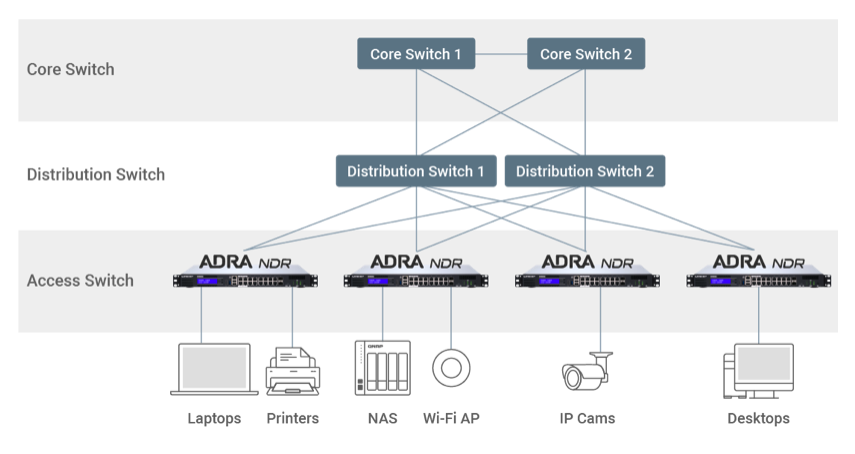

Industrial Facilities
Designed for factory production lines, warehousing and logistics, and indoor industrial environments. Reliably transmit data from production and warehouse endpoints back to the control room or server room, with room to expand later — keeping operations stable in demanding environments and reducing the risk of disconnections and downtime.

Harsh environments breaking the production chain — and maintenance teams stretched thin?
- Occasional latency or dropped frames in surveillance footage hurt real-time decisions and event review
- Complex cabling environments make it hard to run a dedicated power line to every monitoring point or sensor
- Harsh environments where downtime carries a high cost
Recommended Topology: Industrial-Grade Reliable Transmission
- Built-in QoS traffic management ensures critical automation control signals and high-resolution surveillance footage receive priority transmission, keeping data streams uninterrupted and lowering operational risk
- Supports web management and SNMP, bringing on-site nodes into operations management — and works with AMIZcloud for multi-site monitoring
- Industrial-grade protection with IP20 rating, fanless design, wide temperature tolerance, and dual redundant power inputs at wide voltage range — for greater reliability


AI Training
Tailored for enterprise AI and data science teams, R&D groups, and in-house server room deployments — supporting multiple GPU servers running training workloads alongside centralized storage that delivers high-speed reads and writes for datasets and models.

Million-dollar GPU compute power, idling while it waits for data?
- Expensive GPU servers are in place, but limited network bandwidth turns I/O into the bottleneck, sharply reducing training efficiency
- Massive training datasets load slowly, and writing checkpoints drags down model iteration speed
- When scaling out nodes, you don't want to rewire the whole environment — and you need uninterrupted, manageable operations
Recommended Topology: 100GbE Ultra-Fast Training Architecture
- 100GbE ultra-high bandwidth keeps up with frequent reads of massive AI training datasets, smoothing dataset loading and checkpoint writes while reducing training delays and I/O bottlenecks
- A high-density aggregation layer lets you add new GPU or storage nodes on top of the existing high-speed switching fabric — no major rewiring needed
- MC-LAG dual-uplink redundancy combined with LACP link aggregation lowers the risk of single points of failure and keeps training jobs running uninterrupted

AVoIP A/V Transmission
Ideal for conference centers, performance venues, education classrooms, and multi-screen signage environments. By moving audio and video signals onto the network with AVoIP, multiple sources can be switched and distributed across multiple displays in real time — dramatically reducing the limits and maintenance burden of traditional HDMI™ extenders, matrix switchers, and complex cabling.
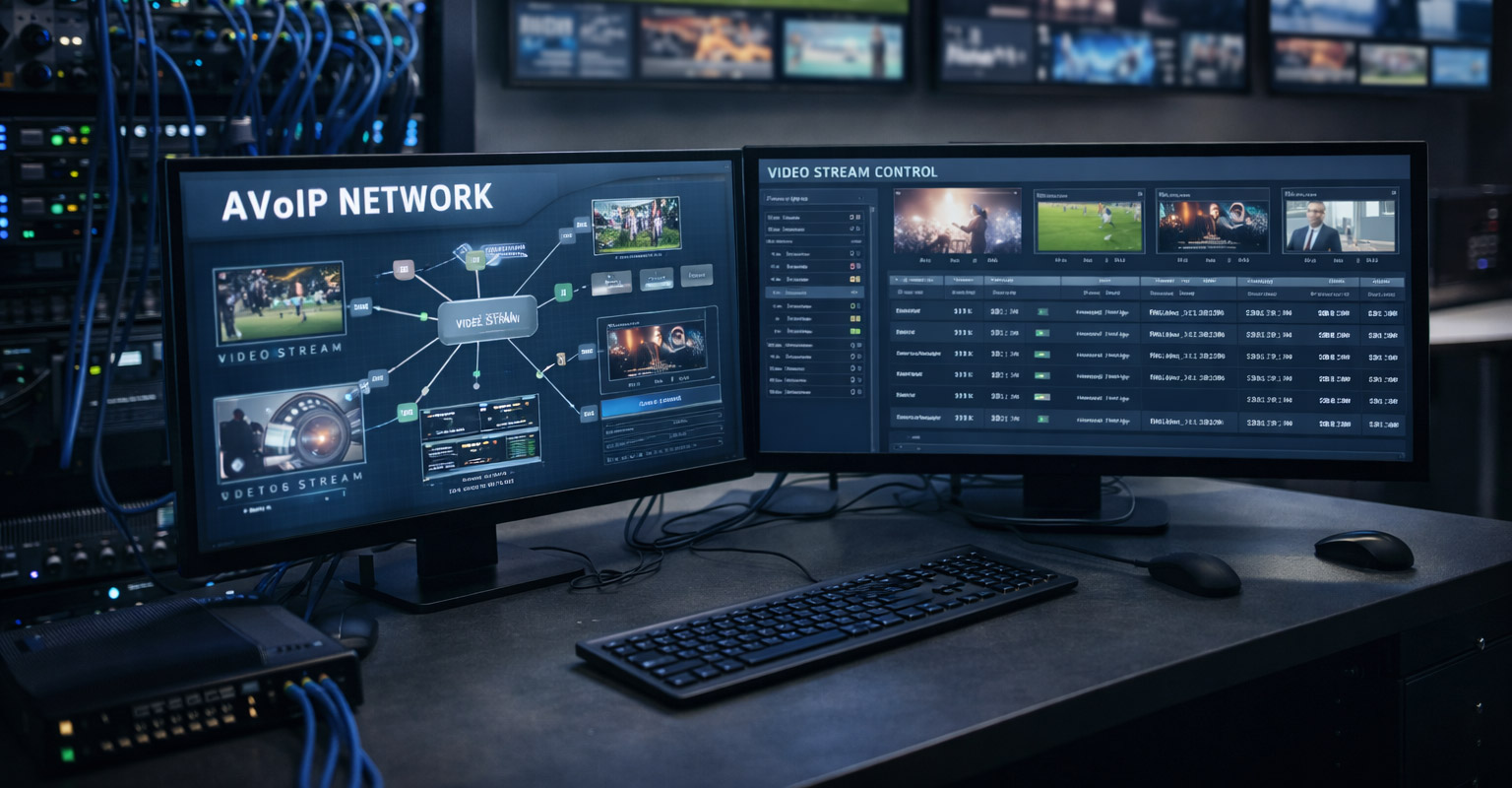
Live event in full swing, and the main screen suddenly goes black or stutters?
- Multi-screen synchronized playback across floors shows out-of-sync frames or ghosting, severely affecting the audience experience
- Traditional HDMI™ cabling is limited in length and complex to deploy
- When other traffic shares the network, A/V is easily disrupted and stability is hard to guarantee
Recommended Topology: Low-Latency A/V Transmission
- Low-latency transmission and stable A/V traffic handling, paired with PTP time synchronization, prevent stutters, black screens, and signal loss in meetings, livestreams, and monitoring
- Replace large amounts of A/V cabling and extenders with a network architecture that makes signal distribution across meeting rooms and floors far easier
- QoS prioritizes AVoIP A/V and control traffic, so even when the same network is handling heavy file transfers or many users online at once, real-time switching stays smooth and image transmission stays stable

Why Choose QNAP?
QNAP offers more than just switches — its complete product line spans NAS, routers, and more, allowing you to plan storage, networking, and security in one go. This reduces compatibility risks and deployment complexity, making it ideal for everything from high-performance transmission to robust data backup and archiving across diverse application scenarios.
Stable Performance
Reliable high-speed packet processing
Easy Deployment
Plug-and-play with an intuitive management interface
Flexible Expansion
Supports a wide range of speeds and port configurations
All-in-One Integration
Seamlessly connects routers, switches, and NAS
Customer Success Stories

"We've completely streamlined our workflow — loading films directly onto the NAS and seamlessly delivering them to projectors. No more relying on physical drives, no more delays or cumbersome transfer procedures. Everything is in perfect order."
- Ryan Carpenter — Director of Projection Engineering

"We chose QNAP's ADRA NDR because it can uncover internal threats that firewalls cannot detect. One feature worth highlighting is the Honeypot — it lures attackers, identifies their source IP, automatically blocks the threat, and instantly alerts IT administrators."
- Daniele Sacchetti – IT Manager, Lomec Ingranaggi S.r.l.
"QNAP HA clustering eliminates single points of failure in the system — even if one device runs into trouble, we still maintain stable data access."
- Tomasz Matejuk, IT Lead, THE BIG SHORT sp. z o.o. sp. k.
A High-speed NAS for Your High-speed Network Environment
QNAP’s high-speed NAS offer a reliable storage space for your local network applications.
-

25GbE NAS
TS-h2490FU
-

10GbE NAS
TS-1232PXU-RP
-
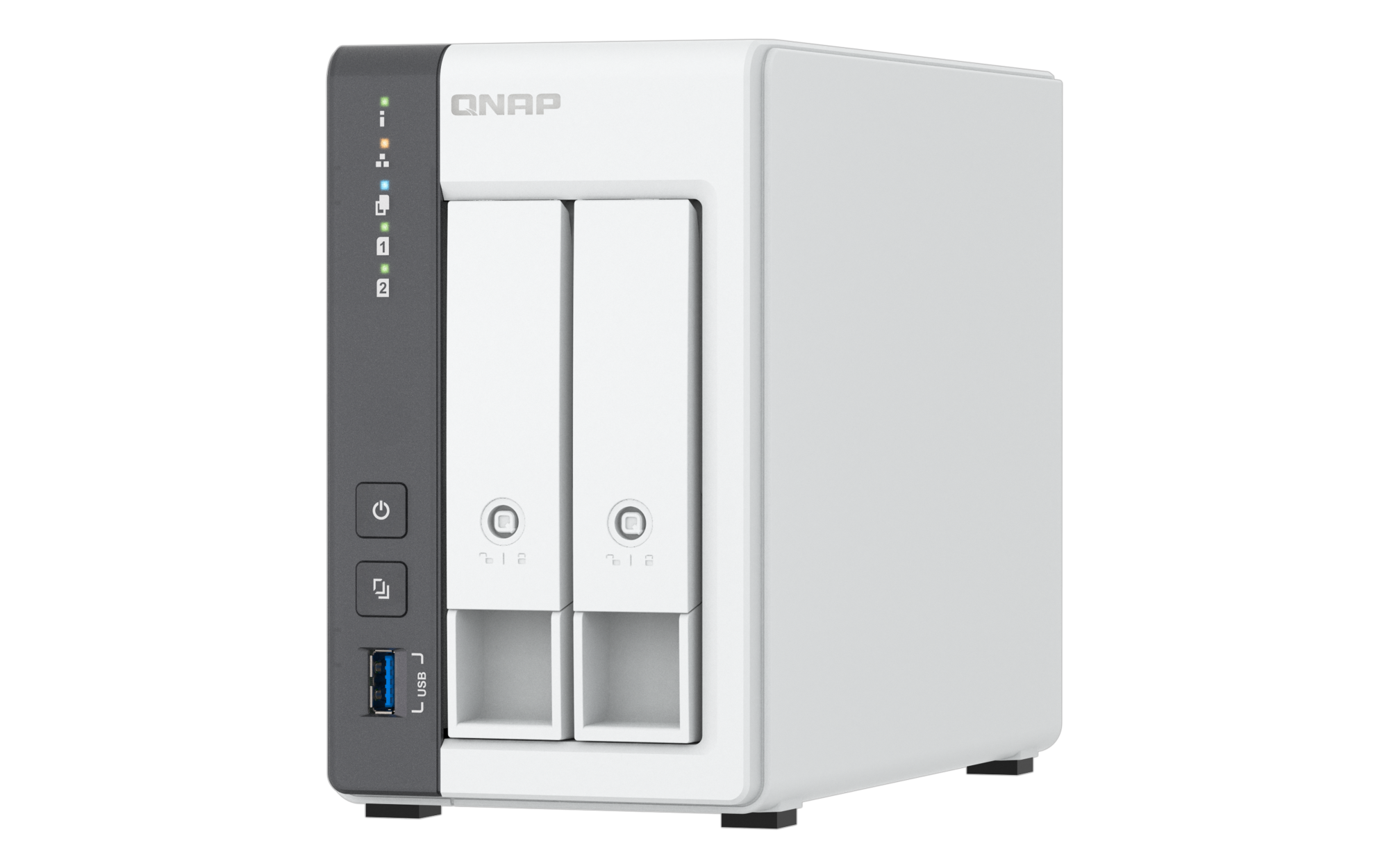
2.5GbE NAS
TS-216G
-

2.5GbE NAS
TS-464
-

10GbE/2.5GbE NAS
TS-h1886XU-RP R2
-

10GbE/2.5GbE NAS
TS-h973AX
-

10GbE/2.5GbE NAS
TS-435XeU
-

Can't find the NAS for your Switch? Let us help you select the right one.
Need help?
Contact us now to get more recommended products or solutions catered to your needs and requirements!


